





Mexico RFC Number: How to acquire & verify RFC in 2026 (Step-by-Step)

 Open in ChatGPT
🗒️ Key Highlights
- RFC is mandatory for all business operations in México – invoicing, payroll, banking, contracts, and import declarations since January 2025.
- CFDI 4.0 validates RFC information in real-time during every invoice transaction, checking business names, addresses, and compliance status automatically.
- Automated verification through Signzy's México APIs connects directly to official tax databases, enabling instant RFC and CURP validation for business compliance without navigating complex government portals.
- What is Registro Federal de Contribuyentes (RFC)?
- What is the RFC format?
- Who needs to obtain an RFC in México?
- Who issues RFC numbers in México?
- How to register for RFC?
- Is the RFC the same as a CURP?
- RFC compliance obligations for businesses
- How to ensure RFC compliance in México effectively? Best practices explored
- How to troubleshoot invalid or inactive RFCs?
- How does Signzy validate Mexican RFCs?
- FAQ
Every business operating in México needs an RFC. Period. It's not optional, it's not something you can put off, and it's definitely not as scary as people make it sound.
Think of your RFC like a business license, except it covers way more ground. You need it for invoicing, taxes, opening bank accounts, signing contracts with Mexican companies, basically everything that makes your business legitimate here.
The registration itself is pretty straightforward as well. I’ve spent hours digging through the official SAT documentation, and believe me, the process is actually more streamlined than most people realize.
Let’s start with the basics and work our way up to the stuff that actually matters for keeping your operations running smoothly.
| Aspect | Details |
|---|---|
| Full Name | Registro Federal de Contribuyentes (Federal Taxpayer Registry) |
| Format | Individual: 13 characters (XXXX-YYYYYY-ZZZ) Business: 12 characters (XXX-YYYYYY-ZZZ) |
| Example Format | Individual: VECJ-880326-XXX (4 letters + 6 date digits + 3 homoclave) Business: ABC-680524-P76 (3 letters + 6 date digits + 3 homoclave) |
| Validity | Permanent (unless business closes or individual dies) |
| Processing Time | 1-3 business days (online for individuals only) Same day (in-person at the SAT office) |
| Cost | Free |
| Required Documents | CURP or birth certificate, legal representative ID, business incorporation documents, and address proof (utility bill <90 days old) |
| Renewal | Not required (permanent registration) |

What is Registro Federal de Contribuyentes (RFC)?
The Registro Federal de Contribuyentes, commonly known as RFC, is México's federal taxpayer registry system administered by the Servicio de Administración Tributaria (SAT). This unique identifier serves as the fundamental tax identification number for all individuals and entities conducting economic activities in México, functioning similarly to how the Social Security Number operates for tax purposes in the United States or the Tax File Number in Australia.
RFC is legally required under Article 27 of the Código Fiscal de la Federación.
What is the RFC format?
The RFC follows a standardized alphanumeric format of either 12 or 13 characters, depending on whether the taxpayer is an individual (persona física) or a legal entity (persona moral. RFC format examples are as follows:
- Individuals (Persona Física): 13 characters - Example: GOMJ850215AB3
- Legal Entities (Persona Moral): 12 characters - Example: ABC12345678A9
Here’s the RFC format breakdown:
| Position | Component | Description | Example (Individual) | Example (Legal Entity) |
|---|---|---|---|---|
| 1-4 | Name Code | First two letters of paternal surname + first letter of maternal surname + first letter of given name (individuals) OR 3 letters of legal name (entities) | GOMJ (Gómez Martínez Juan) | ABC (ABC Corporation) |
| 5-10 | Registration Date | Year (2 digits) + Month (2 digits) + Day (2 digits) of birth (individuals) or incorporation (entities) | 850215 (February 15, 1985) | 123456 (Date of incorporation) |
| 11-12 | Homoclave | Unique alphanumeric code assigned by SAT to differentiate taxpayers with identical initial combinations | AB3 | A9 |
| 13 | Check Digit | Verification digit (individuals only) | 3 | N/A |
Now, let’s see why it matters and who needs it.
Who needs to obtain an RFC in México?
- Businesses with a local presence, whether that’s a warehouse, office, or distribution hub
- Foreign companies selling to customers in México, even if they don't have boots on the ground
- E-commerce sellers using Mexican marketplaces or delivering to Mexican addresses.
- Import/export businesses moving goods across the Mexican border
- Companies with Mexican employees, since payroll processing (CFDI Nómina) legally requires an RFC
- Any business issuing or receiving invoices in México, including SaaS platforms, logistics providers, and contractors
Who issues RFC numbers in México?
SAT (Servicio de Administración Tributaria), which is México's federal tax administration agency equivalent to the IRS in the United States or the CRA in Canada, is responsible for issuing RFC numbers.
How to register for RFC?
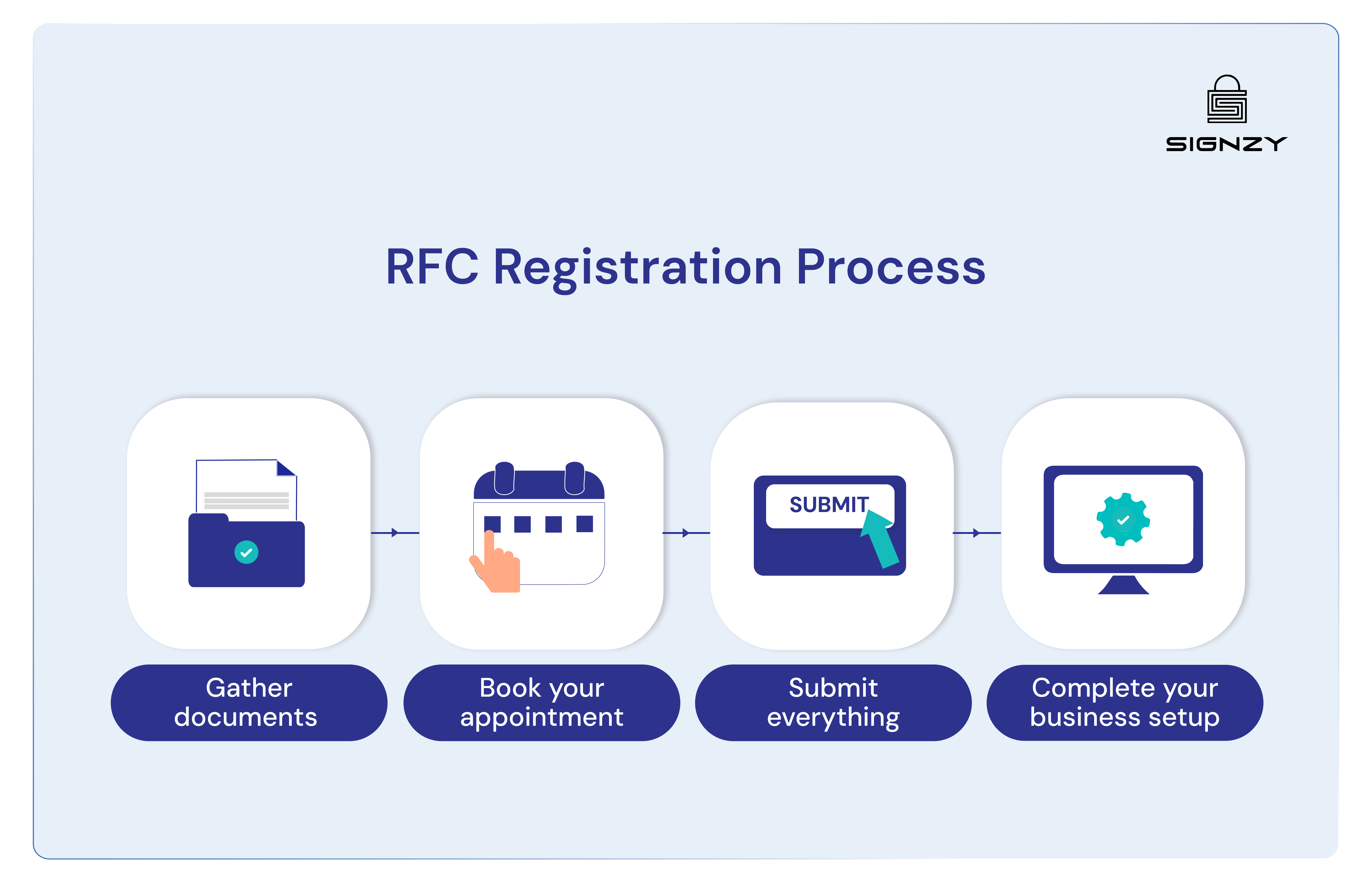
Registering for the RFC requires completing a formal application process through SAT, either digitally via their online portal or by attending an appointment at a local SAT office with the necessary documentation.
Step 1: Obtain your CURP
The CURP, which stands for Clave Única de Registro de Población, serves as a prerequisite for RFC registration. If you are a legal resident in México, your CURP appears on your residency card. You can also retrieve it online at gob.mx/curp if needed.
If you need to retrieve or verify your CURP, you can access it through the official government website at gob.mx/curp by entering your personal details.
Step 2: Get your documents together
Here are the documents you need to collect before starting your application.
For individuals, you need:
- Printed CURP
- Residency card
- Official identification, like a passport.
For companies, you need:
- Incorporation documents
- Proof of business address, like a utility bill or a lease agreement
- Representative’s official ID
- Identification for the legal representative.
- Immigration papers for the owners who are foreign
- Your home country tax ID (required for foreign companies)
Step 3: Choose your registration method
SAT offers two ways to register.
- Online option
- In-person appointment
The online option is faster and more convenient, but you cannot get your e-firma digital signature this way. The in-person option requires an appointment but lets you set up your e-firma at the same time, which you will need for making future changes to your tax information.
Step 4: Apply online
Go to the SAT website and find the RFC registration section. Enter your CURP, full name as it appears on your documents, and email address. Add your fiscal address and check that all information is correct before submitting.
Step 5: Schedule an in-person appointment
Visit the SAT appointment portal and select the RFC registration service. Choose your state and nearest SAT office. You will likely need to join a waiting list, and the system will email you when appointments become available. Wait times can range from several weeks to months.
Step 6: Receive your RFC number
After SAT reviews your application, you will receive your RFC number with either 12 or 13 characters. You also get an official registration document with a QR code and a tax identification card showing your RFC number. Keep this document for all tax and administrative purposes.
Is the RFC the same as a CURP?
No, the CURP and RFC are two separate identification systems in México. The CURP is a population registry code issued automatically to all citizens and residents for general identification purposes, while the RFC is specifically a tax identification number that requires a separate application and is used exclusively for fiscal and business activities.
In case you want to explore the difference between CURP and RFC more deeply, you can read this guide: Complete Guide to CURP, RFC, and CLABE in México [2025]
RFC compliance obligations for businesses
Obtaining your RFC is just the beginning. For business owners operating in México, your RFC activates a series of ongoing compliance requirements that govern how you invoice customers, verify business partners, and maintain your standing with SAT.
These obligations ensure tax transparency and enable legitimate commercial transactions across the Mexican economy.
CFDI electronic invoicing system
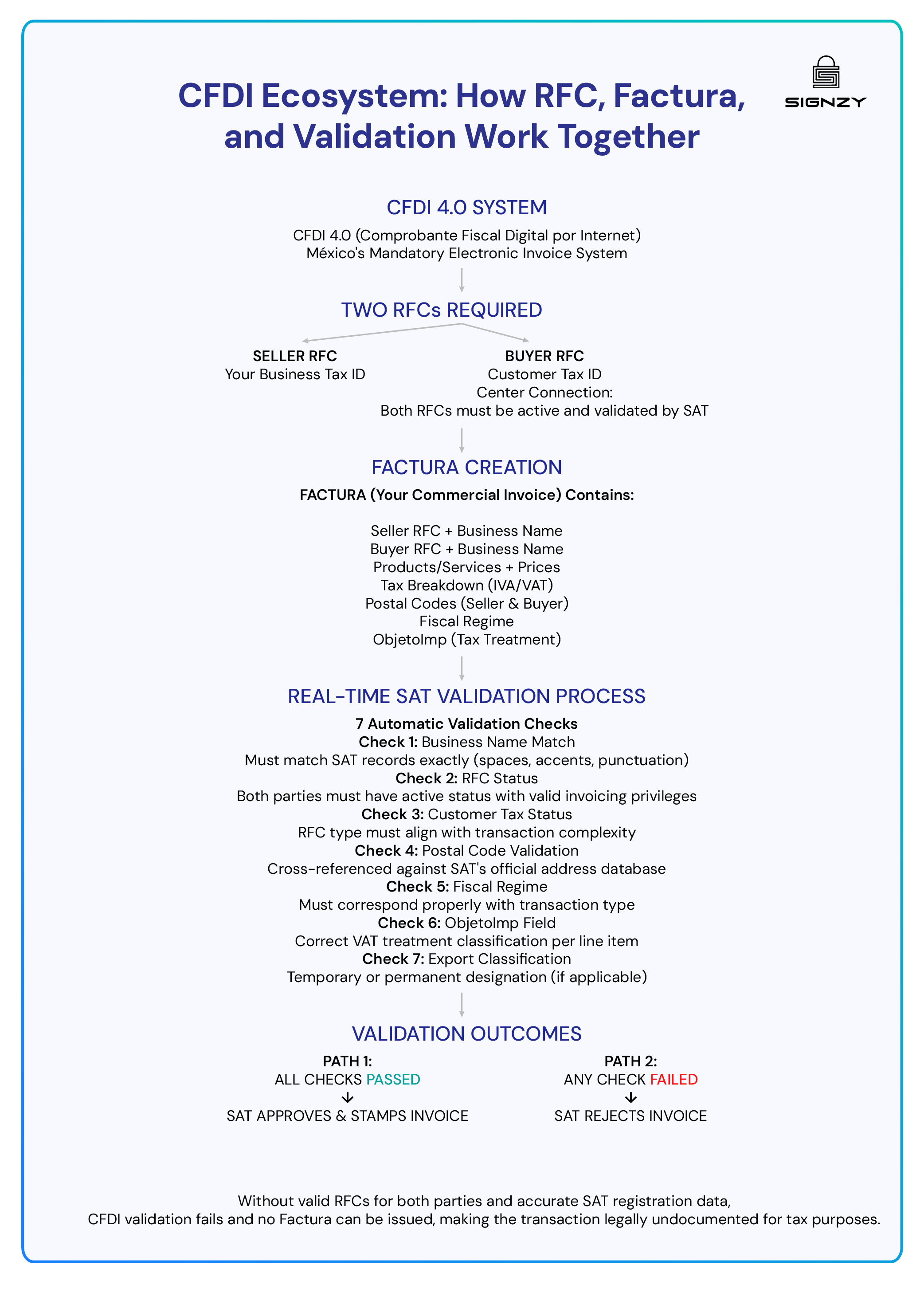
CFDI, which stands for Comprobante Fiscal Digital por Internet, is México's mandatory electronic invoicing system that replaced traditional paper invoices. Every business transaction in México must be documented through a CFDI that gets validated in real-time by SAT using your RFC number.
The current version, CFDI 4.0, became mandatory on April 1, 2023, and introduced stricter validation requirements than previous versions.
Factura Issuance
A Factura is the commercial term for a CFDI invoice that documents transactions for tax purposes. Unlike a simple receipt, a Factura is a legally binding electronic document that links both the seller's and buyer's RFC numbers through SAT's validation systems.
You must issue a Factura whenever you sell goods or services in a business capacity, regardless of transaction size. Customers who want to claim tax deductions will specifically request a Factura, providing their RFC number for inclusion.
Without a properly issued Factura tied to RFC numbers, neither party can use that transaction for tax reporting purposes. Standard cash register receipts do not qualify as valid tax documentation and cannot be used to claim business expenses or tax credits.
CFDI 4.0 Validation
CFDI 4.0 applies strict validation rules to every invoice you attempt to issue. Each Factura triggers multiple RFC validation checks before SAT accepts it as valid.
Core matching and validation requirements:
- Business Name: Must match SAT records exactly, including spaces, accents, and punctuation
- RFC Status: Both sender and receiver must maintain an active status with valid invoicing privileges
- Customer Tax Status: RFC type must align with the transaction complexity being processed
- Postal Code: Must be cross-referenced and validated against SAT's official address database
- Fiscal Regime: The Customer's tax regime must correspond properly with the transaction type
- ObjetoImp Field: Requires correct VAT treatment classification for each individual line item
- Export Classification: Must specify whether exports are temporary or permanent designation
Missing any of these validation points results in immediate invoice rejection before it reaches your customer. Getting your RFC details registered correctly from the start prevents these issues from disrupting your billing process.
Constancia de Situación Fiscal requirements
The Constancia de Situación Fiscal serves as your SAT-issued proof that your business exists in their tax system. This official document displays your RFC, legal name, fiscal address, tax regime, and registered business activities. Most clients and vendors request this document before establishing business relationships, as it verifies your legitimacy as a taxpayer.
SAT uses your Constancia to perform several critical checks during invoice validation:
- Business activity alignment: Your registered economic activities must match what you actually invoice for, preventing businesses from operating outside their declared scope.
- Address consistency validation: Your physical business location must align with the registered fiscal domicile on file with SAT.
- Outstanding obligation checks: Unpaid taxes, penalties, or missed filing deadlines can block your invoicing privileges entirely until resolved.
Maintaining accurate Constancia information is essential, but verifying this data for every customer or vendor manually is time-consuming.
Automated verification solutions like Signzy validate RFC credentials against the official Constancia records in SAT's system, confirming that business activity classifications, addresses, and compliance status are current and accurate.
Before Signzy, validating RFCs slowed everything down. Now the México RFC Check finishes in seconds. We caught about 12 incorrect RFC entries in the first month alone, which saved us from messy vendor disputes.
— Finance Ops Lead, Trade company (250+ employees)

RFC verification requirements between businesses
México's tax system requires businesses to verify each other's RFC information before conducting transactions. This three-point validation process has become the standard for business-to-business commerce and ensures both parties are legitimate taxpayers.
SAT requires validation of the RFC number, the exact legal name, and the registered postal code for every business transaction. When you provide your RFC to vendors or clients, they cross-reference these three data points against SAT's official database. All three elements must match exactly, or the validation fails, and the transaction cannot proceed with proper tax documentation.
For businesses handling multiple vendor relationships or high transaction volumes, manually verifying RFC details through SAT's portal for each transaction becomes impractical.
Automated RFC validation tools like Signzy integrate directly with SAT's database to verify RFC number, legal name, and postal code in real-time during your existing workflows. This means validation happens automatically during customer onboarding or invoice generation, catching mismatches before they cause transaction failures.
How to ensure RFC compliance in México effectively? Best practices explored
Maintaining RFC compliance requires active management of your tax credentials and business information. The following steps help business owners avoid validation failures and compliance issues.
- Verify your Constancia regularly: Download an updated copy from the SAT portal quarterly to ensure all information remains current and accurate.
- Set up your e.firma during RFC registration: Obtain this biometric signature during your initial in-person SAT visit, as it cannot be acquired through online registration and is required for all invoice issuance.
- Renew your CSD certificates on time: These digital stamp certificates expire every four years and must be renewed before expiration to maintain invoicing capabilities.
- Choose a reliable PAC provider: Select an authorized certification provider with strong uptime records and responsive technical support, as they process every invoice you issue.
- Maintain accurate business records: Update SAT immediately when you change your fiscal address, add new business activities, or modify your corporate structure.
- Monitor your RFC status monthly: Log into the SAT portal to verify your RFC remains active and check for any notifications or compliance requirements.
- Keep customer RFC information current: Validate client RFC details before issuing invoices to prevent rejections due to outdated or incorrect customer information.
- Automate RFC verification for vendors and customers: Rather than manually checking each RFC through the SAT portal, implement automated RFC validation tools like Signzy that verify RFC credentials in real-time during onboarding and transaction processing.
Proactive compliance management prevents invoice rejections, maintains your ability to conduct business transactions, and reduces the risk of SAT audits or penalties for non-compliance.
Signzy reduced our review workload massively. RFC mismatches that used to take 10–15 minutes to investigate now get resolved automatically. It cut our processing time per customer nearly in half.
— Compliance Officer, Mexican lending app (200+ employees)
How to troubleshoot invalid or inactive RFCs?
| Problem | What it means | How to fix it |
|---|---|---|
| Outdated Registration Information | Your fiscal address, business activities, or legal structure changed, but SAT records were not updated. | Log into the SAT portal → Access the RFC update section → Submit changes using e.firma → Download the acknowledgment document with the folio number and QR code. |
| Suspended RFC Status | RFC suspended due to unfiled tax returns, unpaid obligations, or voluntary suspension during inactivity | Access the SAT portal → Select "resumption of activities notice" under RFC updates → Specify resumption date and confirm fiscal address → Receive confirmation document restoring active status. |
| Name and Address Mismatches | Legal business name or postal code in the SAT database does not exactly match what you use for invoicing (missing accents, extra spaces, abbreviations) | Download Constancia de Situación Fiscal → Compare against your invoicing details → Submit RFC update with correct information → Provide supporting documents if needed (incorporation papers, official ID, proof of address). |
| Missing or Expired Digital Certificates | E.firma not set up or CSD certificates expired, preventing invoice issuance. | For e.firma: Schedule an in-person SAT appointment for biometric authentication. For CSD: Access the SAT portal → Request renewal using the current e.firma → Download and install new certificates in the invoicing system. |
| Format Validation Errors | RFC number entered incorrectly or does not match official SAT format requirements | Verify RFC through SAT's official consultation portal → Check for typos, missing characters, or incorrect homoclave → Obtain official RFC from Constancia de Situación Fiscal → Update all systems with correct format. |
| New RFC Processing Delays | Recently registered RFC is not yet searchable in SAT validation systems | Wait 24-72 hours after registration → Check SAT portal for RFC status → Contact SAT if delay exceeds 72 hours → Provide registration folio number for tracking. |
| Complex Compliance Issues | Blacklisted status, ongoing audits, system errors, or unresolved compliance investigations are blocking RFC functionality. | Call SAT support (55 6272 2728 within México) → Provide error details and RFC number → Follow specialized resolution procedures → Consider hiring a licensed tax agent for serious cases. |
How does Signzy validate Mexican RFCs?
Signzy's RFC verification connects directly to México's SAT (Servicio de Administración Tributaria) registry, the authoritative source for all tax identification data in México. The API validates RFC codes in real-time and retrieves comprehensive business intelligence in a single call, eliminating manual lookups and spreadsheet cross-referencing.
When you submit an RFC through Signzy's API, the platform verifies the code format, confirms its active status with SAT, and returns a complete profile including legal name, trade name, registration date, tax compliance status, registered address, and entity type.
Unlike manual RFC verification that requires logging into SAT portals, copying data into spreadsheets, and checking records one by one, Signzy integrates directly into your onboarding workflows through API. This means your team can verify hundreds or thousands of RFCs in bulk without lifting a finger, automatically flagging issues without switching between systems or creating bottlenecks that slow down merchant approval processes.
Signzy saved us hours per week. We used to manually validate around 30 RFCs every Friday because they piled up. Now the system flags errors instantly and we barely touch the queue anymore.
— Compliance Lead, Payments Startup (60+ employees).
If you want to see how APIs can work for your specific business needs, book a demo with us, and we’ll show you exactly how automated validation can fit into your workflows.
About Signzy: Over 1,000 companies worldwide rely on Signzy to handle compliance and identity verification — including Fortune 500 names like Microsoft, Meta, FedEx, Citi, and Mastercard.
With coverage across 150+ countries, our Gartner-recognized One Touch KYC verifies identities in seconds by running document verification, face matching, liveness detection, and AML screening at the same time.


FAQ
What is the difference between RFC and CURP, and do I need both?

What are the penalties for not having an RFC in Mexico?
Do I need an RFC to hire employees in Mexico?
Can I use my RFC immediately after getting it?
How do I verify if a Mexican RFC number is valid before onboarding a vendor?
Can foreign companies get an RFC without a physical presence in Mexico?
How long does it take to get an RFC in Mexico, and what does it cost?
What happens if my RFC application gets rejected?
Saurin Parikh
Saurin is a Sales & Growth Leader at Signzy with deep expertise in digital onboarding, KYC/KYB, crypto compliance, and RegTech. With over a decade of professional experience across sales, strategy, and operations, he’s known for driving global expansions, building strategic partnerships, and leading cross-functional teams to scale secure, AI-powered fintech infrastructure.

Related Blogs
View all

KYB in Mexico: Article 115 and CNBV Rules Explained
![10 Best KYB verification Solutions in Mexico, Ranked [2026 Guide]](https://cdn.sanity.io/images/blrzl70g/production/ae3943b6628d3f28300b61eae9ab04a0279d8e17-5641x1325.webp)
10 Best KYB verification Solutions in Mexico, Ranked [2026 Guide]

11 Best KYC Verification Platforms for Mexico in 2026: Full Review

CURP Verification in Mexico: How to Validate a CURP (2026 Guide)
The best in business


The global API marketplace for KYC, KYB, & AML
Explore the end-to-end verification stack trusted by 1,000 businesses.
Get in touch