





How to Conduct a Secretary of State Business Search? Complete Guide [2026]

 Open in ChatGPT
Key Highlights
- An SOS business search lets you pull official registration data directly from state government records, making it one of the fastest and most reliable ways to verify whether a business is legitimate and currently active.
- Knowing how to interpret SOS results matters as much as running the search itself. Entity status, registered agent details, filing history, and foreign qualification records each tell a different part of the story, and gaps or inconsistencies are often the most important signals.
- For teams verifying businesses at scale, manual portal searches are not practical. Tools like Signzy automate SOS lookups across all 50 states through a single API, layering in EIN verification, UBO checks, and watchlist screening to turn a basic search into a complete KYB workflow.
- What Is an SOS Business Search?
- What database does an SOS business search pull from?
- Why should a business conduct an SOS Search? Common use cases explored
- Who should conduct a SoS business search?
- Step-by-step: How to conduct a Secretary of State business search?
- What information does a SoS business search show?
- Red flags to watch for in SOS search results
- Best Secretary of State business search solutions for KYB verification
- 3 Ways Signzy’s SOS business search tool can help businesses
- FAQ
Every business that formally registers with a U.S. state leaves behind a paper trail. Articles of incorporation, LLC formation documents, annual reports, registered agent details, status changes: all of it gets filed with a state office (usually the Secretary of State) and stored in a public record system. A Secretary of State (SOS) business search is simply the act of looking up those records.
It sounds straightforward, and at a basic level, it is. You visit a state website, type in a business name or entity number, and pull up whatever that state has on file. But in practice, knowing how to run these searches well, and more importantly, knowing how to read and interpret the results, is a skill that matters across a surprisingly wide range of business scenarios.
Whether you are vetting a potential vendor, running KYB (Know Your Business) verification, or confirming that a partner entity is in good standing, an SOS business search is often the starting point.
This guide walks through the entire process. We will cover what an SOS business search actually is, how to conduct one step by step (with a full list of state search portals), and more. The guide also includes the best tools available if you need to do this at scale. Let us get into it.

What Is an SOS Business Search?
An SOS business search is a public records lookup that lets you find official filing information about a business entity registered with a U.S. state.
The "SOS" refers to the Secretary of State, which is the state office responsible for handling business registrations in most states. In a few states, the equivalent office goes by a different name (for example, Florida uses the Division of Corporations, and New York uses the Division of Corporations within the Department of State), but the concept is the same everywhere.
You can typically search by the business name, entity number, registered agent name, officer name, or (in some states) by address or federal tax ID. The search returns a summary of the entity's public filing record: its legal name, entity type, formation date, current status, registered agent, and often a history of documents filed with the state.
What database does an SOS business search pull from?
An SOS business search pulls from the official business entity database maintained by that specific state's filing office. There is no single national database behind these searches. Each state independently maintains its own registry of corporations, LLCs, limited partnerships, and other entity types that have filed formation or registration documents with that state.
Here is a complete list of Secretary of State (or equivalent office) business search databases across all 50 states:
| State Database | Database Link |
|---|---|
| Alabama Secretary of State | sos.alabama.gov |
| Alaska Secretary of State | commerce.alaska.gov |
| Arizona Secretary of State | arizonabusinesscenter.azcc.gov |
| Arkansas Secretary of State | ark.org |
| California Secretary of State | bizfileonline.sos.ca.gov |
| Colorado Secretary of State | sos.state.co.us |
| Connecticut Secretary of State | service.ct.gov |
| Delaware Secretary of State | icis.corp.delaware.gov |
| Florida Secretary of State | search.sunbiz.org |
| Georgia Secretary of State | ecorp.sos.ga.gov |
| Hawaii Secretary of State | hbe.ehawaii.gov |
| Idaho Secretary of State | sosbiz.idaho.gov |
| Illinois Secretary of State | apps.ilsos.gov |
| Indiana Secretary of State | bsd.sos.in.gov |
| Iowa Secretary of State | sos.iowa.gov |
| Kansas Secretary of State | sos.ks.gov |
| Kentucky Secretary of State | sosbes.sos.ky.gov |
| Louisiana Secretary of State | coraweb.sos.la.gov |
| Maine Secretary of State | apps3.web.maine.gov |
| Maryland Secretary of State | egov.maryland.gov |
| Massachusetts Secretary of State | corp.sec.state.ma.us |
| Michigan Secretary of State | mibusinessregistry.lara.state.mi.us |
| Minnesota Secretary of State | mblsportal.sos.state.mn.us |
| Mississippi Secretary of State | corp.sos.ms.gov |
| Missouri Secretary of State | bsd.sos.mo.gov |
| Montana Secretary of State | biz.sosmt.gov |
| Nebraska Secretary of State | nebraska.gov |
| Nevada Secretary of State | esos.nv.gov |
| New Hampshire Secretary of State | quickstart.sos.nh.gov |
| New Jersey Secretary of State | njportal.com |
| New Mexico Secretary of State | enterprise.sos.nm.gov |
| New York Secretary of State | apps.dos.ny.gov |
| North Carolina Secretary of State | sosnc.gov |
| North Dakota Secretary of State | firststop.sos.nd.gov |
| Ohio Secretary of State | businesssearch.ohiosos.gov |
| Oklahoma Secretary of State | sos.ok.gov |
| Oregon Secretary of State | egov.sos.state.or.us |
| Pennsylvania Secretary of State | file.dos.pa.gov |
| Rhode Island Secretary of State | business.sos.ri.gov |
| South Carolina Secretary of State | businessfilings.sc.gov |
| South Dakota Secretary of State | sosenterprise.sd.gov |
| Tennessee Secretary of State | tncab.tnsos.gov |
| Texas Secretary of State | mycpa.cpa.state.tx.us |
| Utah Secretary of State | businessregistration.utah.gov |
| Vermont Secretary of State | bizfilings.vermont.gov |
| Virginia Secretary of State | cis.scc.virginia.gov |
| Washington Secretary of State | ccfs.sos.wa.gov |
| West Virginia Secretary of State | apps.wv.gov |
| Wisconsin Secretary of State | apps.dfi.wi.gov |
| Wyoming Secretary of State | wyobiz.wyo.gov |
These databases are built and updated from the documents businesses are required to submit over the life of the entity: formation filings, annual or biennial reports, amendments, mergers, dissolutions, registered agent changes, and so on.
Why should a business conduct an SOS Search? Common use cases explored
An SOS business search is one of the quickest ways to verify basic facts about a company using an official government source. It takes minutes, costs nothing in most states, and gives you information that would be difficult to fabricate. That makes it a practical first step in a wide range of business scenarios.
Here are the most common use cases.
Entity verification before signing a contract
Before entering into any agreement with another company, it is reasonable to confirm that the entity actually exists, is registered in the state it claims, and is currently in active status. An SOS search gives you that confirmation directly from the state's records. If the entity shows up as dissolved, revoked, or suspended, that is something you want to know before you sign anything.
Business name availability checks
If you are forming a new company, most states require that your chosen name be distinguishable from names already on file. Running an SOS search lets you check whether your desired business name (or something confusingly similar) is already taken in that state. This is typically the first step before filing formation documents.
KYB (Know Your Business) and compliance verification
For companies in financial services, fintech, payments, or any industry with regulatory obligations, verifying the legitimacy of business partners and clients is not optional. An SOS search is a foundational layer of KYB verification. It confirms the entity's legal name, type, jurisdiction, and status, all of which feed into broader compliance and anti-fraud workflows.
Vendor and supplier due diligence
Procurement teams and operations leads often need to vet new vendors before onboarding them. An SOS search helps confirm that a vendor is a legitimately registered entity and not operating under a lapsed or revoked registration. It also surfaces the registered agent and sometimes officer details, which can be useful for verifying the people behind the business.
Mergers, acquisitions, and investment due diligence
In any M&A or investment scenario, verifying the target company's state registration, entity structure, and filing history is standard practice. An SOS search is typically one of the earliest checks in the due diligence process, often followed by deeper investigations into financials, litigation, and regulatory standing.
Confirming good standing for licensing or lending
Many business transactions require a company to be in "good standing" with the state. Banks, licensing authorities, and government agencies may ask for proof of good standing before approving loans, issuing licenses, or awarding contracts. An SOS search (or a formal certificate of good standing obtained through the same office) provides that verification.
These are not the only scenarios, but they cover the majority of reasons businesses run SOS searches on a regular basis. The common thread is simple: when you need to confirm that a business is what it says it is, the state's own records are the most authoritative place to start.
Who should conduct a SoS business search?
An SOS business search is not limited to any one industry or company size. Any organization that needs to verify the legitimacy, registration status, or basic details of another business entity has a reason to run one.
That said, certain types of businesses find themselves conducting these searches far more regularly than others.
- Financial institutions and banks: Banks, credit unions, and lending companies routinely verify entity status before extending credit, processing loan applications, or onboarding business accounts. An SOS search confirms the borrowing or depositing entity is active and properly registered in its claimed jurisdiction.
- Fintech and payments companies: Companies processing payments, issuing cards, or facilitating money movement are subject to strict KYB and AML obligations. SOS searches are a foundational step in verifying merchant and business client identities during onboarding.
- Insurance companies: Insurers verify the legal standing of business clients and policyholders as part of underwriting and claims processing. Confirming that an entity is active and registered in the state it claims helps reduce fraud risk.
- Accounting and audit firms: Auditors and accountants verify entity registrations as part of financial audits, tax preparation, and compliance reviews. Confirming that a client entity is in good standing can be a prerequisite for issuing certain audit opinions.
- Private equity and venture capital firms: Investors use SOS searches as an early step in evaluating acquisition targets, portfolio companies, or prospective investments. It is standard practice to confirm that the target entity exists, is active, and matches the representations made during the deal process.
- Enterprise procurement and supply chain companies: Large organizations with extensive vendor networks use SOS searches to verify that suppliers and contractors are legitimately registered entities before onboarding them into procurement systems or issuing purchase orders.
- Real estate and title companies: Title searches and property transactions frequently require verification that the business entities involved (buyers, sellers, lenders, developers) are active and in good standing with the state.
- Startups and small businesses: Entrepreneurs forming new companies run SOS searches to check whether their desired business name is available. They also use these searches to research competitors, vet potential partners, and confirm the status of companies they are considering doing business with.
- Government agencies and regulatory bodies: Federal, state, and local agencies may verify business registrations as part of licensing, permitting, grant applications, or enforcement actions.
Step-by-step: How to conduct a Secretary of State business search?
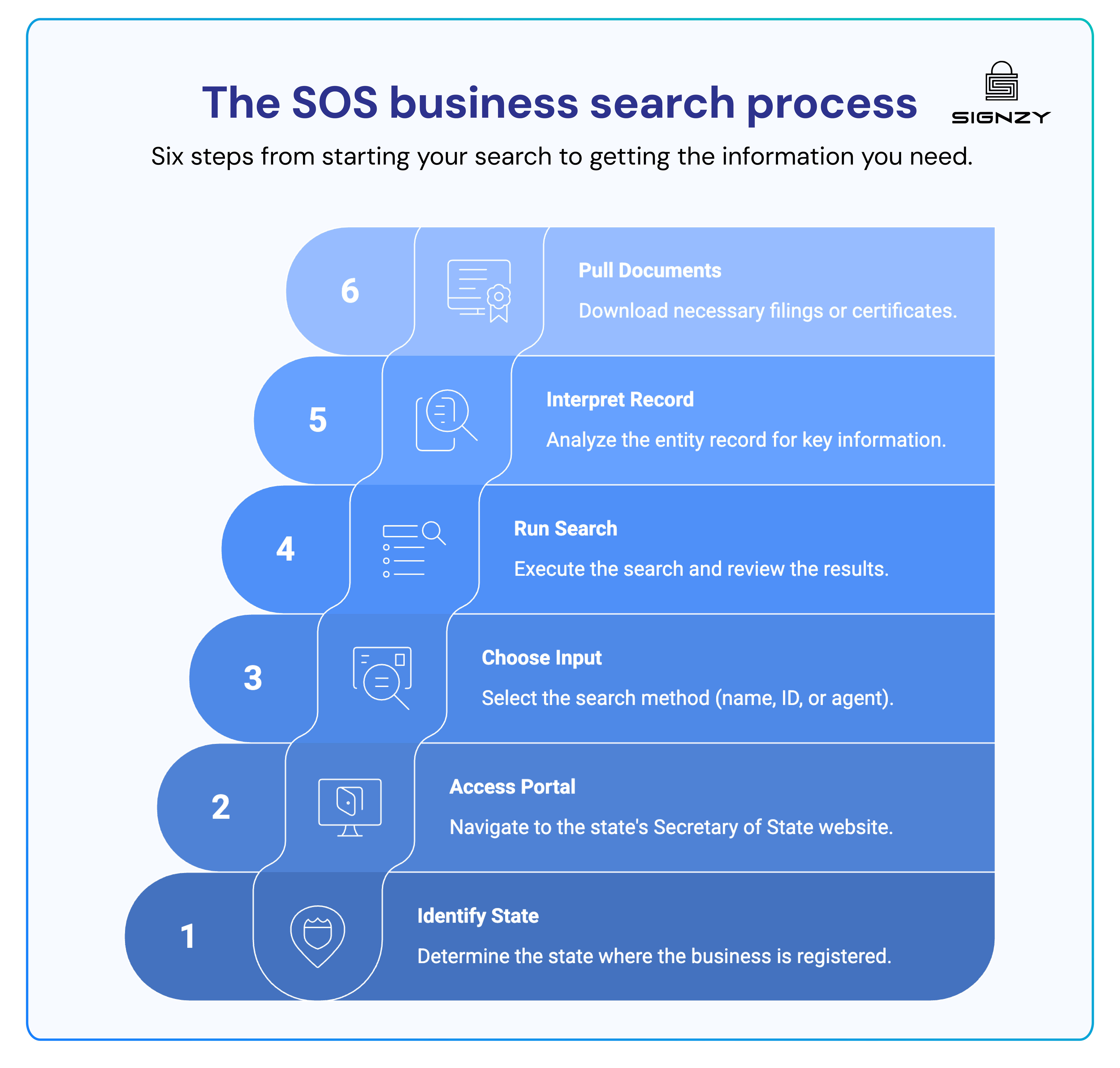
If you are verifying one business or searching within a single state, the manual process is straightforward enough to follow on your own. For teams running SOS searches at volume, across multiple states, or as part of a KYB workflow, a purpose-built SOS search tool can automate each of these steps through a single integration (more on that later).
Step 1: Identify the right state
Start with the state where the business is registered, not necessarily where it operates. A company headquartered in Texas may be incorporated in Delaware. If you are unsure, check any contracts, invoices, or business cards the company has shared. The registered state is often listed there.
Step 2: Go to that state's SOS portal
Use the state database table above to find the correct portal. Each state has its own search interface, and they vary significantly in design and search options.
Step 3: Choose your search input
Most portals let you search by business name, entity ID, registered agent name, or officer name. Business name search is the most common starting point. Use the legal name if you know it. Trade names and DBAs may not appear.
Step 4: Run the search and review the results
Look through the results list carefully. Similar names may return multiple entries. Click through to the full entity record to see status, formation date, registered agent, and filing history.
Step 5: Interpret the entity record
Check the entity status first (active, dissolved, suspended). Then review the registered agent, formation date, and any recent filings or amendments. This is the core of what the search tells you.
Step 6: Pull supporting documents if needed
Most portals let you download filed documents such as articles of incorporation or annual reports. If you need proof of good standing, you can request a certificate directly through the same office, sometimes instantly, sometimes with a processing delay.
What information does a SoS business search show?
- Legal business name and any name history or amendments
- Entity type (LLC, corporation, LP, nonprofit, etc.)
- State of formation or incorporation
- Formation or registration date
- Current entity status (active, dissolved, suspended, revoked, etc.)
- Registered agent name and address
- Principal office address
- Names of officers, directors, or members (varies by state)
- Entity ID or file number assigned by the state
- History of documents filed with the state
- Effective date of any status changes
- Foreign qualification details if the business is registered in multiple states
Which information can't be found via the SOS business search?
- Financial statements, revenue, or profitability data
- Outstanding tax liabilities or IRS filings
- Pending or past litigation and court judgments
- UCC filings or secured creditor information
- Beneficial ownership beyond what is publicly filed
- Credit history or payment behavior
- Number of employees or operational details
- Licenses, permits, or industry-specific certifications
- Sanctions or watchlist matches
- Background information on individual officers or owners
Red flags to watch for in SOS search results
🚩 Dissolved, revoked, or suspended status: The business is no longer in good standing and may not be legally authorized to operate or enter into contracts.
🚩 Very recent formation date: A company claiming years of experience but incorporated weeks ago is worth scrutinizing closely.
🚩 Frequent name changes: Repeated amendments to the business name can indicate rebranding to escape a negative history.
🚩 No registered agent on file: A missing or resigned registered agent suggests the business may not be maintaining its legal obligations.
🚩 Mismatched state of registration: The state they claim to be registered in does not match what the SOS record shows.
🚩 No annual reports filed: Gaps in filing history may indicate the business has been inactive or neglecting its compliance obligations.
🚩 Multiple entity restarts under similar names: A pattern of dissolving and re-registering under near-identical names can be a deliberate tactic to avoid liability.
🚩 Address tied to a registered agent service only: No verifiable physical business address beyond a third-party agent can indicate a shell or paper company.
🚩 Officer or director details missing: States that require officer disclosure showing blank or minimal information may indicate incomplete or evasive filings.
🚩 Foreign qualification gaps: A business operating across multiple states but only registered in one may be non-compliant in the states where it actually conducts business.
Best Secretary of State business search solutions for KYB verification
Running SOS searches manually through individual state portals is workable for occasional, one-off lookups. But for teams that verify business entities as part of onboarding, compliance, or due diligence workflows, manual searches do not scale.
The portals vary by state, the data formats are inconsistent, and there is no way to feed results directly into a compliance system. The tools below are built to solve that.
Signzy
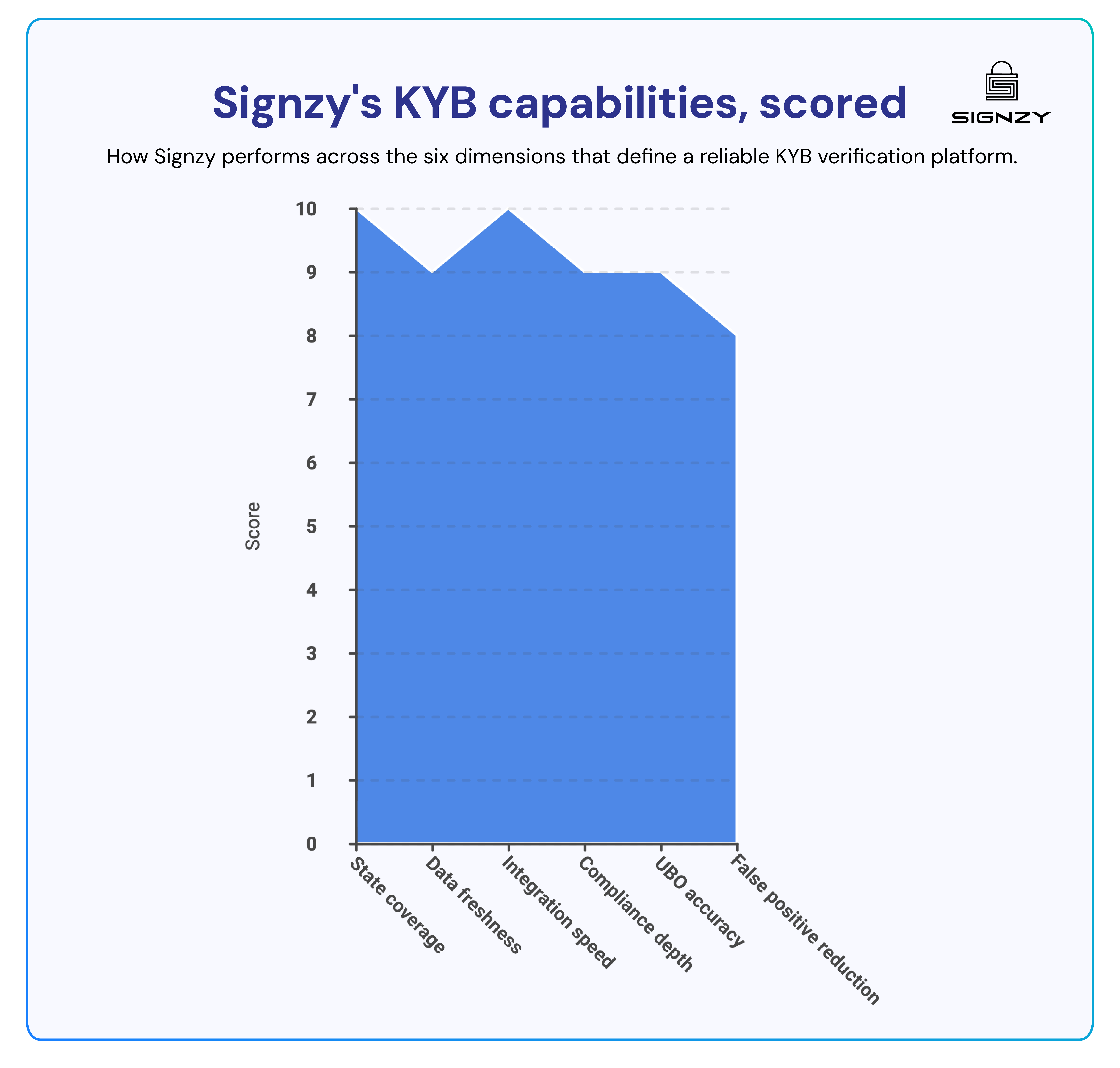
Signzy provides SOS business search across all 50 U.S. states through a single API, designed specifically for KYB, AML, and CDD compliance workflows. Beyond standard SOS data, Signzy goes deeper by combining public and private databases to surface EIN verification, UBO checks, UCC filings, watchlist screenings, and bankruptcy data, all in one unified verification workflow.
Key capabilities:
- Real-time SOS data retrieval across all 50 U.S. states through one integration
- Cross-referencing across multiple databases for high data accuracy
- EIN validation against official records, returning business name, license, industry, and address details
- Beneficial ownership and UBO structure checks to identify money laundering risk
- Near real-time data sync with state SOS databases to maintain accuracy
- Data encryption, secure APIs, and compliance with GDPR and CCPA
- API integration that can go live in 48 hours
An SOS search alone was never enough for our compliance requirements. Signzy layering in EIN verification, UBO checks, and watchlist screening in the same workflow changed how we onboard business clients entirely.
— KYB Compliance Lead, Fintech Lending Platform.

LexisNexis Risk Solutions
LexisNexis combines SOS registration data with a broad network of public and proprietary records, making it a strong fit for organizations that need due diligence layers beyond what state filings alone provide. It is widely used by banks, insurers, and enterprise compliance teams that require deeper risk intelligence alongside basic entity verification.
Middesk
Middesk is a business identity platform built primarily for financial institutions and fintech companies running KYB at scale. It aggregates SOS data alongside other public records to give compliance teams a consolidated view of a business entity, available through both a dashboard interface and a developer API for teams embedding verification directly into their onboarding workflows.
3 Ways Signzy’s SOS business search tool can help businesses
An SOS search is a starting point, not a complete KYB check on its own. The gap between pulling a single state record and running a reliable, repeatable verification process is where most compliance teams lose time.
Signzy is built to close that gap. Here is how it helps in practice.
1. Signzy gives you SOS coverage across all 50 states without touching a single state portal
Instead of navigating individual state portals, Signzy retrieves SOS records from all 50 states through a single API call, with near real-time sync ensuring the data you receive reflects the latest state filings.
We operate across multiple states, and our compliance team was spending hours each week on manual SOS lookups. That time is now spent on actual risk decisions.
— VP Compliance, Insurance Platform
Your team gets consistent, structured results regardless of which state the entity is registered in, without the portal-by-portal friction that slows down manual searches.
2. Signzy turns a basic SOS lookup into a full KYB verification in one workflow
Where a standard SOS search returns registration status and basic entity details, Signzy layers on EIN verification, UBO checks, watchlist screenings, UCC filings, and bankruptcy data, all accessible through the same integration. That means your compliance team is not stitching together results from multiple sources. Everything needed to make an onboarding decision comes back in one place.
3. Signzy is built to go live fast and scale without adding headcount
Signzy's API is designed to integrate quickly, with most implementations going live within 48 hours. Once connected, the same workflow handles one verification or a thousand, making it practical for teams that need to grow their onboarding volume without proportionally growing their compliance team.
Ready to see it in action? Book a demo with Signzy and see how automated SOS search fits into your KYB workflow.


FAQ
Can a business be legally operating even if it does not appear in an SOS search?

Does an SOS search work for businesses registered in other countries?
How often is the information in SOS databases updated?
Can two businesses have the same name in an SOS database?
Saurin Parikh
Saurin is a Sales & Growth Leader at Signzy with deep expertise in digital onboarding, KYC/KYB, crypto compliance, and RegTech. With over a decade of professional experience across sales, strategy, and operations, he’s known for driving global expansions, building strategic partnerships, and leading cross-functional teams to scale secure, AI-powered fintech infrastructure.

Related Blogs
View all

10 Best KYB Verification Services in 2026 | Complete Comparison Guide

10 Best KYB Verification Platforms in India – 2026 Guide
![9 Best KYB Verification Solutions in UAE [2026 Guide]](https://cdn.sanity.io/images/blrzl70g/production/e370a2c7f5369f9c2228d7b9a4aaecb2fd19927a-5642x1326.webp)
9 Best KYB Verification Solutions in UAE [2026 Guide]
![11 Best KYB verification solutions in Canada, Ranked [2026 Guide]](https://cdn.sanity.io/images/blrzl70g/production/dc490f248b28a2ab2773faa7b712a01640036226-5641x1325.webp)
11 Best KYB verification solutions in Canada, Ranked [2026 Guide]
The best in business


The global API marketplace for KYC, KYB, & AML
Explore the end-to-end verification stack trusted by 1,000 businesses.
Get in touch