





How to Verify TIN Online? Free, Paid, and Bulk Methods [2026]

 Open in ChatGPT
🗒️ Key Highlights
- A Tax Identification Number (TIN) is a nine-digit IRS tax ID used to identify individuals and businesses for U.S. tax reporting, covering SSNs, EINs, ITINs, and other IRS-issued IDs.
- There’s no single public IRS TIN lookup; free validation is available through the IRS TIN Matching Program for authorized payers, but it involves manual uploads and 24-48hr processing.
- Reliable TIN verification helps avoid backup withholding, reporting errors, and IRS penalties when paying contractors or onboarding vendors.
- Automated TIN verification tools and APIs like Signzy’s accelerate real-time TIN name/TIN matching for payroll, compliance, and business partnerships.
- What are Tax Identification Numbers (TINs)?
- Who needs to verify TIN?
- How to conduct TIN verification in the US?
- What does the TIN verification report reveal?
- What Are the IRS Penalties for Incorrect TINs?
- Common TIN verification errors and how to fix them
- TIN verification best practices for businesses
- How to respond to IRS CP2100/CP2100A notices?
- How can Signzy help with TIN verification?
- FAQ
Need to verify a TIN number? You’ve come to the right place!
Whether you’re onboarding a new customer, working with a contractor, or just want to make sure your records are spot-on, verifying TIN numbers is actually pretty straightforward once you know where to look.
The best part? There is a free and easy way to check these numbers, and as well as paid options that allow for bulk verification. This guide covers both options so you can pick what works best for your situation.
TIN (Taxpayer Identification Number) verification in the US can be done through the IRS TIN Matching Program (free, with results in 24–48 hours for bulk requests) or through automated TIN verification APIs that return results in 2–5 minutes.
We’ll also dive into the simple steps that’ll help you get this done quickly and accurately. But first, let’s understand the basics.

What are Tax Identification Numbers (TINs)?
A Tax Identification Number (TIN) are unique nine-digit identifiers assigned to individuals and businesses for tax reporting purposes in the United States.
This system was established under the Internal Revenue Code to create a standardized way of identifying taxpayers across all federal tax processes.
In the US tax system, TINs come in several forms depending on your situation:
TIN includes:
- SSN
- ITIN
- EIN
- ATIN
- PTIN
| Type of TIN | Format | Purpose | Used By |
|---|---|---|---|
| Social Security Numbers (SSNs) | Nine-digit numbers | Personal tax filings | Individual taxpayers, employees, and self-employed individuals |
| Individual Taxpayer Identification Numbers (ITINs) | Nine-digit numbers | US tax returns for those ineligible for SSN | Non-resident aliens, dependents, or spouses of US taxpayers |
| Employer Identification Numbers (EINs) | Nine-digit numbers (also called Federal Tax ID numbers) | Track business tax obligations and payroll responsibilities | Businesses, partnerships, corporations, and LLCs |
| Adoption Taxpayer Identification Numbers (ATINs) | Temporary nine-digit numbers | Claim tax benefits for children in adoption process | Adoptive parents (for children without SSNs yet) |
| Preparer Tax Identification Numbers (PTINs) | Nine-digit number. Starts with letter “P” | Required for preparing federal tax returns | Paid tax return preparers |
Important distinction: ITINs expire if not used on a federal tax return for three consecutive years, per IRS ITIN expiration rules. This means a previously valid ITIN may return a mismatch during verification if it has lapsed — a common source of confusion for businesses onboarding non-resident contractors.
Who needs to verify TIN?
- Businesses and employers: Any company with employees or contractors must verify TINs during onboarding and before processing payments over $600 annually. This includes small businesses, startups, and enterprises across all industries. You need valid TINs to file W-2s for employees and 1099s for independent contractors.
- Financial institutions: Banks, credit unions, brokerage firms, and fintech platforms are required to verify TINs when opening accounts, processing transactions, or paying interest and dividends. This falls under Bank Secrecy Act (BSA) and Know Your Customer (KYC) requirements, making TIN verification a foundational compliance checkpoint.
- Property managers and real estate professionals: If you're paying contractors for property maintenance, collecting rent from business tenants, or facilitating real estate transactions, you need to verify TINs for 1099-MISC and 1099-S filings. Title companies and escrow officers verify TINs for all parties in property sales.
- Payment processors and platforms: Companies facilitating gig work, freelance marketplaces, or third-party payment processing must verify TINs before issuing payments. This includes platforms like payment gateways, invoicing services, and contractor management systems that handle 1099-K reporting.
- Accountants and tax preparers: CPAs, bookkeepers, and tax professionals verify TINs on behalf of their clients to ensure accurate tax filings and avoid penalties. They're often the ones catching TIN errors during year-end 1099 preparation, making verification a core service offering.
- Non-profit organizations: Tax-exempt entities paying contractors, vendors, or employees must verify TINs just like for-profit businesses. Non-profits filing 1099s for grants, consulting fees, or service payments face the same IRS reporting requirements and penalties for errors.
How to conduct TIN verification in the US?
TIN verification can be done manually through the IRS TIN Matching Program or automated via TIN verification APIs.
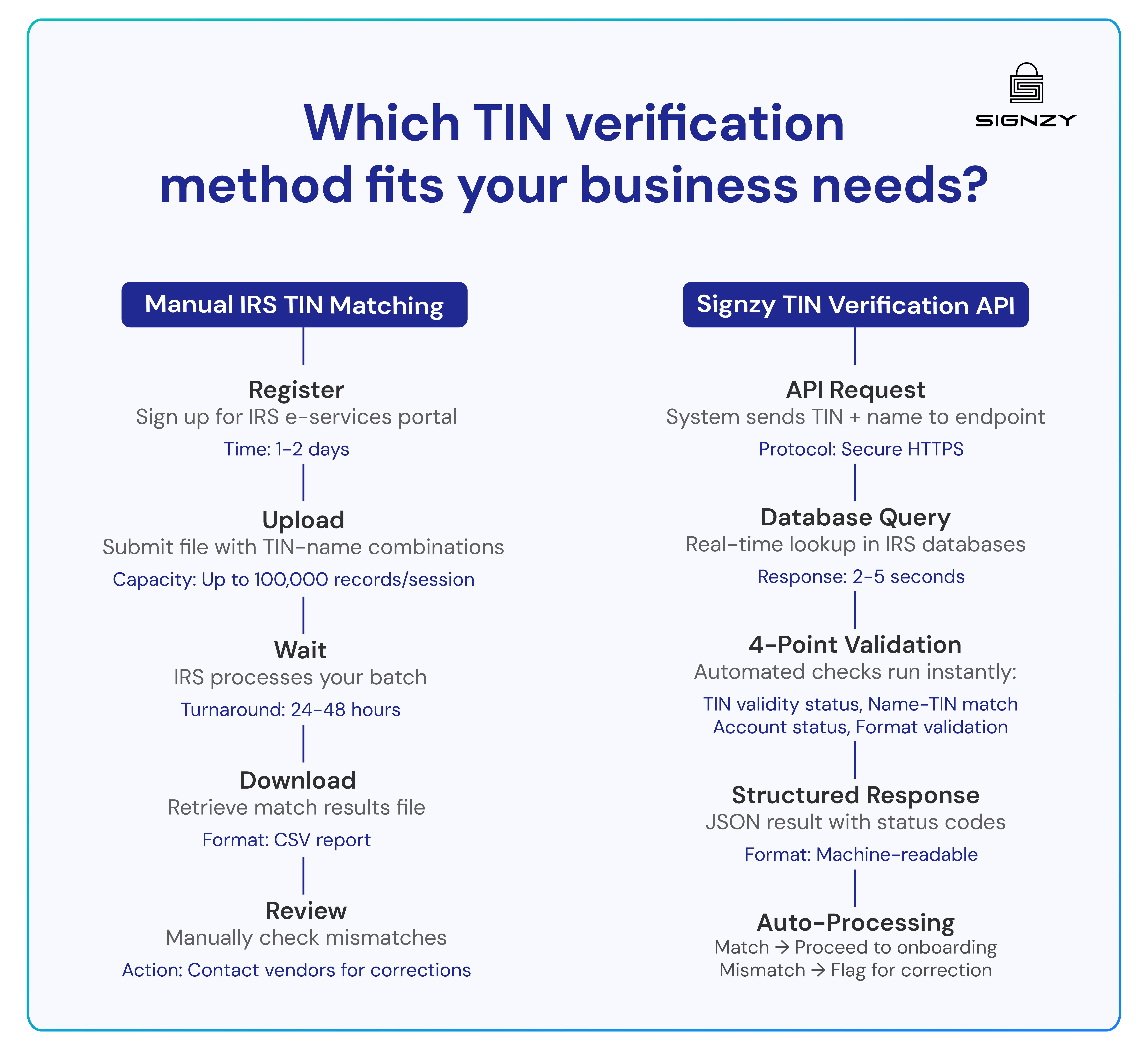
Let’s take a detailed look at both methods.
Manual TIN verification
The IRS offers a free TIN Matching Program through its e-services portal. Businesses can upload files with name and TIN combinations (up to 100,000 records per session) and receive match results within 24 to 48 hours. This works for annual compliance checks or one time validation of small vendor lists. However, the system has limitations: it requires IRS e-services registration, operates only during business hours, and doesn't integrate with existing workflows.
For businesses verifying TINs sporadically or dealing with a limited number of vendors, the manual approach is functional. For operations requiring instant verification or processing thousands of transactions, it becomes a bottleneck.
How to register for IRS TIN Matching:
- Visit IRS e-Services and create an account through ID.me identity verification (requires SSN, government-issued photo ID, and a selfie for facial recognition)
- Log in and navigate to TIN Matching — submit your application with your business name, EIN, and role/authority
- Await approval (typically a few business days); you'll receive email confirmation
- Accept the Terms of Agreement to begin using the service
Eligibility requirements: You must be an authorized payer who has filed at least one information return (Forms 1099-B, -DIV, -INT, -K, -MISC, -OID, -PATR, or -NEC) in the past two tax years, per IRS Publication 2108. Your business must be listed in the IRS Payer Account File (PAF) database.
Automated TIN verification solutions
TIN verification APIs like Signzy automate the validation process by connecting directly to IRS databases or authorized data sources, returning match results in 2 to 5 minutes. This enables businesses to verify TINs during onboarding, payment setup, or account creation rather than waiting days for batch results.
What impressed me most about Signzy was the data depth. Getting 30+ business data points alongside EIN verification meant we could assess vendor risk inside out. Worth every penny for the peace of mind alone.
— Chief Compliance Officer, Financial Services (1000+ employees)

In practice, TIN Verification APIs work by:
- Data submission: Your system sends the TIN and associated name to the API endpoint via secure HTTPS request. For SSNs, this includes first and last name. For EINs, it's the legal business name as registered with the IRS.
- Database query: The API connects to IRS databases or authorized third party data sources in real time, querying against the same datasets the IRS uses for tax processing.
- Match validation: The system compares the submitted name and TIN combination, checking for exact matches, common variations like middle initials or business name formatting, and flagging mismatches.
- Response delivery: The API returns a structured response in JSON format with status codes indicating exact match, name mismatch, invalid TIN format, or TIN not found in IRS records.
- Workflow integration: Your system processes the response automatically. Matched TINs proceed through onboarding or payment processing. Mismatches trigger error handling, prompting users to resubmit information or flagging records for manual review.
The core advantage of Signzy’s TIN verification API is timing. When you verify a TIN during contractor onboarding or account opening, you catch errors immediately while the individual is still engaged in the process. They can correct typos, provide the right number, or clarify mismatches on the spot.
Compare this to discovering a TIN mismatch in January when filing 1099s for work completed months earlier. Now you're chasing down contractors, delaying filings, and facing potential penalties because the IRS deadline doesn't wait for corrections.
How Do the Methods Compare?
| Feature | IRS TIN Matching (Free) | Commercial TIN Verification APIs |
|---|---|---|
| Cost | Free | Pay-per-use or subscription |
| Speed | Instant (25 records) / 24–48 hrs (bulk) | 2–5 minutes (real-time) |
| Volume | Up to 100,000 per session | Unlimited (depends on provider) |
| Registration | Required (IRS e-Services \+ ID.me) | Provider-specific API key |
| Integration | Manual upload/download | REST API with JSON responses |
| Availability | Business hours, limited | 24/7 |
| Additional checks | TIN matching only | Many providers bundle OFAC, PEP, adverse media screening |
| Best for | Low-volume, annual compliance checks | High-volume onboarding, real-time workflows |
What does the TIN verification report reveal?
When you run a TIN verification, you’ll get valuable information that helps confirm the accuracy of your records:
| TIN Verification Component | What it checks |
|---|---|
| TIN Validity Status | Confirms the number is a legitimate, active TIN in the IRS system or flags it as invalid, expired, or incorrectly formatted |
| Name-TIN Match Confirmation | Verifies the name on file exactly matches the name associated with that TIN in IRS records |
| Account Status Information | Shows whether the TIN is currently active and in good standing or if there are issues affecting tax processing |
| Format Validation | Confirms the nine-digit number follows proper TIN formatting rules and passes basic authenticity checks |
This verification data lets you make informed decisions about proceeding with payroll processing, contractor payments, or business partnerships.
When all four components return positive results, you have documented proof that the TIN is valid and matches IRS records. When any component fails, you know immediately that you need corrected documentation before making payments or filing information returns.
The IRS returns specific response codes for TIN Matching requests, as documented in IRS Publication 2108A: Code 0 (match), Code 1 (missing TIN or name), Code 2 (TIN not currently issued), Code 3 (name/TIN mismatch), Code 4 (invalid request), and Code 5 (duplicate submission).
What Are the IRS Penalties for Incorrect TINs?
Filing information returns with incorrect TINs triggers penalties under IRC §6721 (failure to file correct returns) and IRC §6722 (failure to furnish correct payee statements). The penalty amounts are adjusted annually for inflation.
2025–2026 Penalty Rates
| Correction Timing | Penalty Per Return | Small Business Cap (≤$5M revenue) | Large Business Cap (\>$5M revenue) |
|---|---|---|---|
| Corrected within 30 days of deadline | $60 | $239,000 | $683,000 |
| Corrected 31 days late through August 1 | $130 | $683,000 | $2,049,000 |
| After August 1 or not corrected | $330–$340 | $1,397,000 | $4,191,500 |
| Intentional disregard | $660–$680 (or 10% of reportable amount, whichever is greater) | No cap | No cap |
Source: IRS Information Return Penalties, Revenue Procedure 2024-40 (inflation adjustments)
Practical example: A company with 200 contractors discovers 15 TIN mismatches after filing. At $330 per return, that's $4,950 in penalties — plus mandatory 24% backup withholding on all future payments to those contractors until the mismatches are corrected.
Common TIN verification errors and how to fix them
TIN verification errors fall into four main predictable patterns:
Name mismatch errors
This occurs when the name on your W-9 doesn't exactly match IRS records. Common causes include using a business DBA instead of the legal entity name, missing or incorrect middle initials, nickname variations (Robert vs Bob), etc. Fix this by requesting the exact legal name as it appears on the entity's tax returns or Social Security card.
For businesses, verify the legal entity name through Secretary of State registrations. For individuals, ask them to check their most recent tax return or Social Security card for the precise name format.
Name mismatches cause IRS CP2100 notices, require corrected filings, and can lead to backup withholding requirements even if the TIN itself is valid. Also, an invalid TIN triggers automatic 24% backup withholding on all payments and results in IRS penalties ranging from $60 to $660 per incorrect information return (2025–2026 rates, adjusted annually for inflation).
Invalid or inactive TIN
The TIN format appears correct but doesn't exist in IRS databases or has been deactivated. This happens with recently dissolved businesses whose EINs are no longer active, SSNs that were never issued or have been flagged for fraud, typos that create valid-looking but non-existent numbers, or TINs from entities that never completed IRS registration.
Verify the TIN by asking the individual or business to provide their most recent tax filing confirmation. For EINs, check the IRS EIN confirmation letter (CP 575). For SSNs, request a copy of the Social Security card or recent W-2. If the TIN is genuinely inactive due to business closure, you'll need to obtain a new W-9 from the current operating entity.
Wrong TIN type for entity structure
Using an SSN when an EIN is required, or vice versa.
- Single-member LLCs often cause confusion because they can use either the owner's SSN or apply for a separate EIN depending on tax election.
- Multi-member LLCs, corporations, and partnerships must use EINs.
- Sole proprietors without employees typically use their SSN but may have an EIN.
Fix this by clarifying the entity's legal structure and tax classification. Ask whether they file as a sole proprietor (Schedule C), partnership (Form 1065), S-corp (Form 1120-S), or C-corp (Form 1120). The tax filing form determines which TIN type is correct.
| Entity Type | Required TIN | Tax Filing Form |
|---|---|---|
| Sole proprietor (no employees) | SSN (or optional EIN) | Schedule C |
| Single-member LLC | Owner's SSN or LLC's EIN | Schedule C or 1120 |
| Multi-member LLC | EIN | Form 1065 |
| S-Corporation | EIN | Form 1120-S |
| C-Corporation | EIN | Form 1120 |
| Partnership | EIN | Form 1065 |
Formatting and data entry errors
These are simple mistakes like transposed digits, missing numbers, or incorrect hyphen placement. The IRS requires TINs in specific formats: SSNs as XXX-XX-XXXX and EINs as XX-XXXXXXX. Common errors include reversing digit pairs (123-45-6789 entered as 132-45-6789), dropping leading zeros, adding extra digits, or omitting hyphens in system fields that expect them.
Prevent these by implementing format validation in your data entry systems. Use dropdown menus or auto-formatting fields that structure the TIN correctly as users type. Double-entry verification (entering the TIN twice) catches transposition errors.
When verification fails, immediately request a corrected W-9 with the exact information as it appears in IRS records.
Most importantly, don't process payments or complete onboarding until verification succeeds. The cost of delayed onboarding is minor compared to the penalties, backup withholding requirements, and administrative burden of fixing incorrect tax forms after the fact.
TIN verification best practices for businesses
The optimal TIN verification approach builds verification checkpoints into multiple stages of the business relationship and maintains updated records through periodic revalidation.
Verify before first payment, not after
The most important verification happens before you establish the business relationship and process the first payment. Waiting until year-end to verify TINs for 1099 filing means you're discovering errors after you've already paid the contractor and established expectations.
At that point, you're in a weak position to demand corrected documentation, and the contractor may be unresponsive or difficult to locate.
Hence, it’s better to verify TINs during onboarding as part of the W-9 collection process. This creates leverage because the individual wants to get paid, so they're motivated to provide correct information promptly.
Revalidate annually for ongoing relationships
A TIN that was valid last year may not be valid this year. For vendors and contractors you work with repeatedly, implement annual TIN revalidation at the start of each calendar year. This catches changes before tax filing season and gives you time to obtain corrected W-9s.
The revalidation doesn't need to be manual. Signzy handles bulk verification of your entire vendor database, processing hundreds or thousands of records simultaneously and flagging only the entries that fail validation for follow-up.
This converts what would be weeks of manual checking into an automated process that completes in hours.
Document every verification attempt
When the IRS sends a CP2100 notice about a TIN mismatch, your defense is documentation showing you performed reasonable due diligence (more on this in a minute). Keep records of when you requested W-9s, when you verified TINs, what the verification results were, and any follow-up attempts to obtain corrections.
This audit trail proves you didn't ignore verification requirements. It also helps during disputes with contractors who claim they provided correct information.
Set thresholds that trigger verification
Not every payment requires the same verification rigor. Establish business rules based on payment volume and relationship type.
- For one-time payments under $600, basic W-9 collection may suffice since you won't file a 1099.
- For payments approaching or exceeding the $600 annual threshold, verify TINs before processing.
- For high-value contracts or ongoing vendor relationships, verify TINs regardless of payment amount.
- For international vendors or complex entity structures, layer additional verification like beneficial ownership checks or entity validation.
These thresholds help you allocate verification effort where compliance risk is highest.
The pattern across all these practices is consistency and automation. The upfront investment in building these workflows pays off through fewer IRS notices and eliminated last-minute scrambles to obtain corrected W-9s during tax filing season.
How to respond to IRS CP2100/CP2100A notices?
The IRS sends CP2100 and CP2100A notices when information returns you filed (1099s, W-2s, etc.) contain TIN and name combinations that don't match their records. These notices typically arrive several months after you file, listing all the mismatched records from your submission.
The notice itself isn't a penalty, but it requires action. You need to solicit corrected TINs from the individuals or businesses listed, update your records, and potentially start backup withholding on future payments if you can't obtain corrections. The response process has specific steps and deadlines.
- Within 15 business days of receiving the notice, send a B-Notice to each person or business listed, informing them that their TIN and name combination didn't match IRS records and requesting corrected information. You must use the specific B-Notice format provided in IRS Publication 1281.
- If the payee provides a corrected TIN, verify it before your next information return filing. If they don't respond or the corrected TIN still fails verification, you must begin backup withholding at 24% on future payments.
- Keep documentation of all B-Notices sent, responses received, and verification attempts made. This documentation proves reasonable cause if the IRS later assesses penalties for continued mismatches.
The key is treating CP2100 notices as early warnings rather than administrative annoyances. They indicate gaps in your verification process that need systematic correction before they become penalty events.
How can Signzy help with TIN verification?
Signzy helps businesses conduct TIN verification with dedicated APIs for both SSN verification and EIN verification that validate in real time using official IRS and state databases. The platform integrates into existing workflows within a week, shifting TIN validation from a year end scramble to an automated checkpoint during onboarding.
↪ Eliminates manual lookups with automated verification
Manual TIN verification through the IRS e-services portal creates operational delays that compound across your organization. You're uploading files, waiting 24 to 48 hours for results, and processing verifications only during business hours.
Signzy's API-based verification removes these delays by automating verification at the point of data collection. The system connects directly to official IRS databases and state registries, querying records in real time rather than through batch processing.
We process over 500 contractor onboardings monthly, and manual SSN verification was creating 3-4 day delays in every single one. Signzy's API integration helped us to reduce that timeline from 5 days to same-day processing. The efficiency gain paid for the implementation in two months.
— Head of Payroll Operations, Lending Platform (100+ employees)
↪ 100% Data accuracy from official sources
The platform connects directly to IRS databases and state registries rather than aggregated third party sources.
- For EIN verification, this means complete 50 state coverage with data refreshed every few hours.
- For SSN validation, the system cross references against official records to detect deceased individuals, identity fraud patterns, and address risks.
This source reliability supports KYC and AML compliance requirements under the USA Patriot Act.
↪ Complete compliance suite beyond TIN Verification
TIN validation is one checkpoint in comprehensive due diligence workflows. Regulated businesses (such as financial services, crypto platforms, gaming/gambling, etc) need to verify identity, screen for sanctions, check backgrounds, and monitor for fraud patterns alongside basic TIN matching.
Signzy's platform allows you to layer multiple verification types in a single integration, reducing the complexity of managing separate vendor relationships for each compliance requirement.
- AML screening integration: Combine TIN validation with OFAC watchlist checks, sanctions screening, and adverse media monitoring in a single API call for complete risk assessment.
- KYC workflow support: Layer identity document verification, biometric checks, and background screening alongside TIN validation for comprehensive customer due diligence.
- Automated audit trails: Every verification attempt is logged with timestamps and response codes, providing documentation for IRS notices and regulatory audits without manual record keeping.
In simple words, instead of calling separate APIs for TIN validation, sanctions screening, identity verification, and background checks, Signzy consolidates these workflows into a unified system. This reduces integration complexity, simplifies vendor management, and creates a single audit trail across all verification activities.
To know more about Signzy’s TIN verification API, book a demo here.


FAQ
Is TIN verification free?

Can I verify TINs in bulk?
What happens if a TIN doesn't match the name?
Is TIN verification required by law?
Can you verify a TIN directly with the IRS?
What causes a TIN mismatch during verification?
How can businesses automate TIN verification during onboarding?
What is the difference between IRS TIN Matching and SSNVS?
How do TIN verification requirements differ for 1099-NEC vs. 1099-K filers?
Gaurav Gupta
Gaurav Gupta is the Global Product Head at Signzy, leading the strategy and development of the company’s KYC, KYB, AML, and digital onboarding products used by banks, fintechs, and financial institutions across global markets. He specializes in building scalable compliance and verification platforms, transforming complex regulatory and risk workflows into seamless, automated product experiences. Gaurav works at the intersection of product, engineering, and AI.

Related Blogs
View all![5 Taxpayer Identification Number Types Explained [2026]](https://cdn.sanity.io/images/blrzl70g/production/ab51b58ad90fb655dc3a2a9121557160dfe3276a-2821x663.png)

5 Taxpayer Identification Number Types Explained [2026]

What is a Tax Identification Number (TIN)? Complete Guide

SSN vs. EIN vs. ITIN: Business owner’s guide to Taxpayer Identification Numbers

What Is an EIN? Employer Identification Number Explained (2026)
The best in business


The global API marketplace for KYC, KYB, & AML
Explore the end-to-end verification stack trusted by 1,000 businesses.
Get in touch